Filtros y mezclas
Lección 17 de 37 · 5 min
Brillo, contraste, desenfoque, un vidrio esmerilado, tintas que se superponen: muchas cosas que antes se resolvían en un editor de fotos hoy son una línea de CSS, y se pueden cambiar en vivo.
Funciones de filter
filter procesa los píxeles ya dibujados del elemento, con todo lo que tiene adentro. Recibe una lista de funciones separadas por espacios:
- Desenfoque
blur(4px)Es el único valor en longitud y no acepta porcentajes. - Luz y color
brightness() · contrast() · saturate()100%deja la imagen igual; menos baja, más sube. - Tonos
grayscale() · sepia() · invert()De0%(nada) a100%(del todo). - Giro
hue-rotate(90deg)Gira todos los tonos por la rueda de color. - Y además
opacity() · drop-shadow()opacity()funciona como la propiedad, ydrop-shadow()se ve más abajo.
El orden importa: cada función trabaja sobre el resultado de la anterior, de izquierda a derecha. Si el sepia va al final, pisa el giro de tono; si va primero, el giro tiñe el sepia.
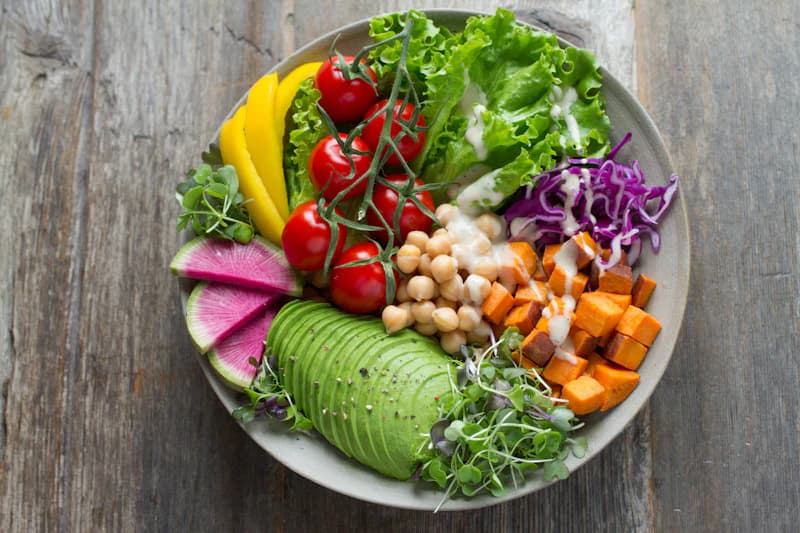
.foto {filter:brightness(105%)contrast(115%)sepia(35%);}
<img class="brightness-105 contrast-115 sepia-35" src="bowl.jpg" alt="Bowl de verduras">
/* marrón: sepia pisa el giro */.foto { filter: hue-rotate(90deg) sepia(100%); }/* verdoso: el giro tiñe el sepia */.foto-verde { filter: sepia(100%) hue-rotate(90deg); }.boton:disabled {filter: grayscale(100%) opacity(60%);}
Un filter distinto de none crea un contexto de apilamiento y pasa a ser el bloque contenedor de sus hijos con position: fixed: un modal fijo adentro de un elemento filtrado se posiciona contra ese elemento, no contra la ventana. Es Baseline desde 2016.
drop-shadow() contra box-shadow
box-shadow dibuja la sombra de la caja: siempre un rectángulo, con el radio que tenga. drop-shadow() dibuja la sombra de los píxeles: sigue el contorno de un PNG o un SVG con transparencia, y aparece también a través de un agujero.
La etiqueta de precio es un SVG con transparencia alrededor, y la línea punteada naranja es la caja del elemento. Cambiá entre las dos sombras y mové el desplazamiento y el desenfoque: una sigue la caja, la otra la forma.
.etiqueta {filter: drop-shadow(0 8px 12px oklch(0 0 0 / 35%));}
<img class="drop-shadow-[0_8px_12px_oklch(0_0_0/35%)]" src="etiqueta.svg" alt="">
A cambio, drop-shadow() no tiene spread ni inset, y acepta una sola sombra por función (para apilar, se encadenan varias). Además es la única sombra que sobrevive a un clip-path: puesta en el padre de un elemento recortado, sigue la forma del recorte.
.recorte-con-sombra {filter: drop-shadow(0 8px 12px oklch(0 0 0 / 35%));}.recorte-con-sombra > .etiqueta {clip-path: polygon(20% 0, 100% 0, 100% 100%, 20% 100%, 0 50%);}
Vidrio esmerilado con backdrop-filter
backdrop-filter acepta las mismas funciones, pero filtra lo que está detrás del elemento, no el elemento. Así se hace el vidrio esmerilado de una barra o un epígrafe sobre una foto.
El efecto solo se ve a través del fondo del elemento, así que el fondo tiene que ser translúcido. Con un fondo opaco el desenfoque queda tapado; sin fondo, el texto queda sobre la imagen y pierde contraste.

La ciudad a la nocheAutopista y rascacielos, 21:40 · foto de la semana
.epigrafe {background: rgb(255 255 255 / 45%);-webkit-backdrop-filter: blur(12px) saturate(180%); /* Safari 17 */backdrop-filter: blur(12px) saturate(180%);}
<figcaption class="bg-white/45 backdrop-blur-[12px] backdrop-saturate-180">La ciudad a la noche</figcaption>
Lo que hay que saber:
- Raíz de fondo
backdrop rootEl elemento solo ve hasta el ancestro más cercano confilter,opacitymenor a 1,mask,clip-path,mix-blend-modeu otrobackdrop-filter. Un vidrio adentro de otro vidrio solo desenfoca lo del vidrio de afuera. - Apilamiento
stacking contextComofilter, crea un contexto de apilamiento y es el bloque contenedor de sus hijos fijos. - Costo
rendimientoEl navegador vuelve a desenfocar el fondo en cada cuadro de scroll. Un radio grande sobre una superficie grande se nota en celulares modestos.
Es Baseline desde septiembre de 2024, cuando Safari 18 lo aceptó sin prefijo. Para Safari 17 y anteriores todavía conviene repetirlo como -webkit-backdrop-filter.
Modos de mezcla
mix-blend-mode decide cómo se combinan los colores de un elemento con lo que tiene detrás, como las capas de un editor de imágenes:
- Multiplicar
multiplySiempre oscurece, y el blanco desaparece. Es como superponer tintas en papel. - Trama
screenLo contrario: siempre aclara, y el negro desaparece. - Superponer
overlayMultiplica los oscuros del fondo y aclara los claros: sube el contraste. - Diferencia
differenceResta un color del otro: el negro no cambia nada y el blanco invierte.
El elemento se mezcla con todo lo que hay detrás dentro de su contexto de apilamiento. isolation: isolate crea un contexto nuevo en el grupo: las tintas se siguen mezclando entre sí, pero ya no con la foto. Probá cada modo y activá el aislamiento para verlo.

.tintas {isolation: auto;}.tinta {mix-blend-mode: multiply;}
<div class="isolation-auto"><span class="mix-blend-multiply bg-[#00a0e3]"></span> <!-- cyan --><span class="mix-blend-multiply bg-[#e5007d]"></span> <!-- magenta --><span class="mix-blend-multiply bg-[#ffe600]"></span> <!-- yellow --></div>
Cualquier cosa que cree un contexto de apilamiento aísla igual (opacity menor a 1, un transform, un z-index en un elemento posicionado); isolation: isolate es la forma de hacerlo sin efectos secundarios.
background-blend-mode mezcla las capas de fondo de un mismo elemento entre sí y con su background-color, sin tocar lo que hay detrás. Las tres propiedades son Baseline desde 2020.
.portada {background:url(foto.jpg) center / cover,oklch(0.7 0.15 40); /* naranja */background-blend-mode: multiply;}
En Tailwind
Cada función de filtro tiene su clase, y Tailwind las junta en un solo filter. Los valores fuera de la escala van entre corchetes.
| CSS | Tailwind |
|---|---|
| blur(4px) · brightness(105%) | blur-[4px] · brightness-105 |
| grayscale(100%) · sepia(35%) | grayscale · sepia-35 |
| filter: drop-shadow(…) | drop-shadow-md |
| backdrop-filter: blur(12px) | backdrop-blur-[12px] |
| mix-blend-mode: multiply | mix-blend-multiply |
| isolation: isolate | isolate |
<!-- orden de Tailwind: hue-rotate antes que sepia --><img class="hue-rotate-90 sepia" src="foto.jpg" alt="…"><!-- otro orden: el filter entero entre corchetes --><img class="[filter:sepia(100%)_hue-rotate(90deg)]" src="foto.jpg" alt="…">
Filters and blending
Lesson 17 of 37 · 4 min
Brightness, contrast, blur, frosted glass, overlapping inks: plenty of things that used to need a photo editor are now one line of CSS, and you can change them live.
Filter functions
filter processes the element's pixels after they're drawn, along with everything inside it. It takes a space-separated list of functions:
- Blur
blur(4px)It's the only one that takes a length, and it doesn't accept percentages. - Light and color
brightness() · contrast() · saturate()100%leaves the image as it is; less lowers, more raises. - Tones
grayscale() · sepia() · invert()From0%(none) to100%(fully). - Hue shift
hue-rotate(90deg)Turns every hue around the color wheel. - And also
opacity() · drop-shadow()opacity()works like the property, anddrop-shadow()comes up below.
Order matters: each function works on the previous one's result, left to right. With sepia last, it wipes out the hue shift; with sepia first, the shift tints the sepia.
.photo {filter:brightness(105%)contrast(115%)sepia(35%);}
<img class="brightness-105 contrast-115 sepia-35" src="bowl.jpg" alt="Vegetable bowl">
/* brown: sepia wins over the shift */.photo { filter: hue-rotate(90deg) sepia(100%); }/* greenish: the shift tints the sepia */.photo-green { filter: sepia(100%) hue-rotate(90deg); }.button:disabled {filter: grayscale(100%) opacity(60%);}
Any filter other than none creates a stacking context and becomes the containing block for its position: fixed children: a fixed modal inside a filtered element is placed against that element, not the viewport. It has been Baseline since 2016.
drop-shadow() versus box-shadow
box-shadow shadows the box: always a rectangle, with whatever radius it has. drop-shadow() shadows the pixels: it follows the outline of a PNG or SVG with transparency, and it even shows through a hole.
The price tag is an SVG with transparency around it, and the orange dashed line is the element's box. Switch between the two shadows and move the offset and the blur: one follows the box, the other the shape.
.tag {filter: drop-shadow(0 8px 12px oklch(0 0 0 / 35%));}
<img class="drop-shadow-[0_8px_12px_oklch(0_0_0/35%)]" src="tag.svg" alt="">
In exchange, drop-shadow() has no spread and no inset, and each function takes one shadow (chain several to stack them). It's also the only shadow that survives a clip-path: on the parent of a clipped element, it follows the clipped shape.
.clipped-with-shadow {filter: drop-shadow(0 8px 12px oklch(0 0 0 / 35%));}.clipped-with-shadow > .tag {clip-path: polygon(20% 0, 100% 0, 100% 100%, 20% 100%, 0 50%);}
Frosted glass with backdrop-filter
backdrop-filter takes the same functions, but it filters what's behind the element, not the element. That's how you get the frosted glass of a toolbar or a caption over a photo.
The effect only shows through the element's background, so the background has to be translucent. An opaque background covers the blur; no background leaves the text on the image with poor contrast.
The city at nightHighway and skyscrapers, 9:40 pm · photo of the week
.caption {background: rgb(255 255 255 / 45%);-webkit-backdrop-filter: blur(12px) saturate(180%); /* Safari 17 */backdrop-filter: blur(12px) saturate(180%);}
<figcaption class="bg-white/45 backdrop-blur-[12px] backdrop-saturate-180">The city at night</figcaption>
Worth knowing:
- Backdrop root
backdrop rootThe element only sees up to the nearest ancestor withfilter,opacitybelow 1,mask,clip-path,mix-blend-modeor anotherbackdrop-filter. Glass inside glass only blurs what's in the outer glass. - Stacking
stacking contextLikefilter, it creates a stacking context and becomes the containing block for its fixed children. - Cost
performanceThe browser blurs the backdrop again on every scroll frame. A large radius over a large surface shows on modest phones.
It has been Baseline since September 2024, when Safari 18 accepted it unprefixed. For Safari 17 and earlier, it's still worth repeating it as -webkit-backdrop-filter.
Blend modes
mix-blend-mode decides how an element's colors combine with what's behind it, like layers in an image editor:
- Multiply
multiplyIt always darkens, and white disappears. Think of inks overlapping on paper. - Screen
screenThe opposite: it always lightens, and black disappears. - Overlay
overlayMultiplies the backdrop's darks and lightens its lights: more contrast. - Difference
differenceSubtracts one color from the other: black changes nothing and white inverts.
The element blends with everything behind it in its stacking context. isolation: isolate creates a new one on the group: the inks still blend with each other, but not with the photo. Try each mode and turn isolation on to see it.
.inks {isolation: auto;}.ink {mix-blend-mode: multiply;}
<div class="isolation-auto"><span class="mix-blend-multiply bg-[#00a0e3]"></span> <!-- cyan --><span class="mix-blend-multiply bg-[#e5007d]"></span> <!-- magenta --><span class="mix-blend-multiply bg-[#ffe600]"></span> <!-- yellow --></div>
Anything that creates a stacking context isolates too (opacity below 1, a transform, a z-index on a positioned element); isolation: isolate does it with no side effects.
background-blend-mode blends an element's own background layers with each other and with its background-color, leaving what's behind alone. All three properties have been Baseline since 2020.
.cover {background:url(photo.jpg) center / cover,oklch(0.7 0.15 40); /* orange */background-blend-mode: multiply;}
In Tailwind
Each filter function has its own class, and Tailwind combines them into a single filter. Values off the scale go in brackets.
| CSS | Tailwind |
|---|---|
| blur(4px) · brightness(105%) | blur-[4px] · brightness-105 |
| grayscale(100%) · sepia(35%) | grayscale · sepia-35 |
| filter: drop-shadow(…) | drop-shadow-md |
| backdrop-filter: blur(12px) | backdrop-blur-[12px] |
| mix-blend-mode: multiply | mix-blend-multiply |
| isolation: isolate | isolate |
<!-- Tailwind's order: hue-rotate before sepia --><img class="hue-rotate-90 sepia" src="photo.jpg" alt="…"><!-- another order: the whole filter in brackets --><img class="[filter:sepia(100%)_hue-rotate(90deg)]" src="photo.jpg" alt="…">